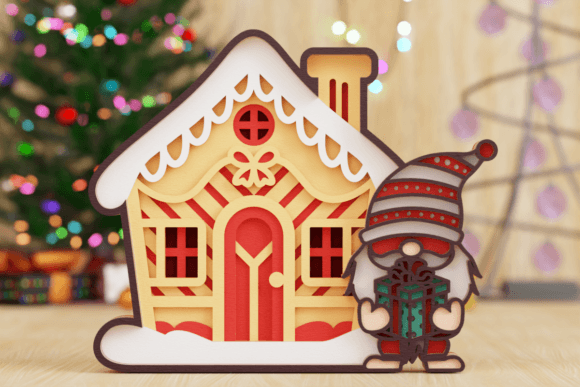
Christmas Gnome with House 3D Multilayer
In the landscape of digital crafting and small-scale manufacturing, precision and versatility are the primary drivers of success. The Christmas Gnome with House 3D Multilayer is not merely a festive graphic; it is a structured design asset engineered for depth, dimension, and professional execution. For entrepreneurs, hobbyists, and content creators alike, understanding the strategic value of high-quality multilayer vector files is essential for maximizing output quality and minimizing production waste.
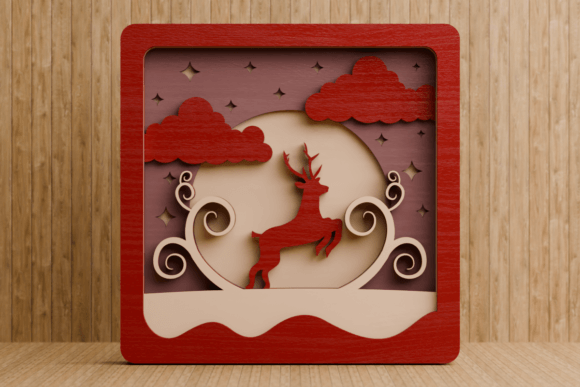
This specific design leverages the principles of papercut artistry to create a three-dimensional effect from two-dimensional materials. By separating the image into distinct layers, each representing a different depth plane, the final assembly casts intricate shadows and creates a sense of realism that flat designs cannot achieve. This guide outlines how to utilize this asset effectively, ensuring that your projects align with both aesthetic goals and operational efficiency.
Understanding the Asset: What You Receive
Before engaging in any production workflow, it is critical to understand the technical specifications of the digital product. The Christmas Gnome with House 3D Multilayer is provided as a comprehensive digital download. It is important to note immediately that this is a virtual product; no physical item will be shipped. The value lies entirely in the source files, which grant you the freedom to reproduce, modify, and sell physical derivatives.
Upon purchase, you will receive a suite of industry-standard file formats designed to ensure compatibility across various software ecosystems and hardware devices:
- AI File: Native Adobe Illustrator format, ideal for users within the Adobe Creative Cloud ecosystem who require full editability of paths and colors.
- EPS File: A robust vector format compatible with a wide range of graphic design applications, including CorelDRAW and Inkscape, ensuring broad accessibility.
- SVG File: Scalable Vector Graphics, perfect for web integration or use with modern cutting machines like Cricut Design Space or Silhouette Studio.
- PNG File: High-resolution raster images suitable for direct printing or quick visual previews without the need for vector tracing.
- PDF File: Portable Document Format, useful for sharing designs or viewing layer structures on devices where editing software is unavailable.
- DXF and DWG Files: AutoCAD-compatible formats. These are particularly valuable for CNC routers, laser cutters, and industrial-grade cutting machines, bridging the gap between digital craft and industrial fabrication.
Having access to these diverse formats allows you to choose the optimal tool for your specific production environment, whether you are using a desktop vinyl cutter or a large-format laser engraver.
Strategic Applications and Use Cases
The versatility of the Christmas Gnome with House 3D Multilayer extends far beyond simple decoration. When approached strategically, this asset can support multiple business objectives, from brand building to customer engagement.
Home Decor and Wall Art
Transforming living spaces with stunning papercut designs is one of the most effective ways to add character to an interior. The multilayer nature of this gnome design allows it to function as dynamic wall art. When mounted on a wall and backlit, the layers cast intricate shadows that change throughout the day as sunlight moves across the room. This interplay of light and shadow adds an elegant, sophisticated touch to any room, making it a compelling product for home decor boutiques or personalized gift shops.
Greeting Cards and Paper Crafts
In the realm of personal communication, thoughtful design stands out. Crafting unique greeting cards using the Christmas Gnome with House 3D Multilayer patterns creates a tactile experience for the recipient. The layered structure introduces depth and texture, turning a standard card into a keepsake. This level of detail signals care and effort, enhancing the emotional resonance of your message and making your communications more memorable.
Scrapbooking and Memory Preservation
For scrapbookers and memory keepers, embellishments play a crucial role in framing narratives. These papercut designs can beautifully frame photos and memories, adding visual interest without overwhelming the central subject. The ability to scale the SVG or EPS files ensures that the gnome motif fits seamlessly into various layouts, maintaining proportion and balance within the project.
Commercial Opportunities
One of the most significant advantages of this digital asset is its commercial potential. You can sell the physical projects created from these files. Whether you are operating an Etsy shop, attending local craft fairs, or supplying corporate holiday gifts, the Christmas Gnome with House 3D Multilayer provides a ready-made, high-value product concept. Because the files include DXF and DWG formats, you are not limited to paper; you can cut acrylic, wood, or metal, expanding your market reach significantly.
Operational Workflow: From Digital to Physical
To achieve professional results, a systematic approach to production is necessary. Randomly cutting layers often leads to misalignment and wasted materials. Follow this refined workflow to ensure consistency and quality.
- Download and Secure the Files: Immediately save the downloaded archive to a dedicated folder on your computer. Organize your assets properly to avoid version control issues later.
- Extract the Archive: Unzip the file to access the individual formats. Verify that all layers are present and intact.
- Software Integration: Upload the appropriate file type (e.g., SVG for Cricut, AI/EPS for Illustrator) into your design software. Take time to inspect the layers. Ensure that the "serial" order of the layers corresponds to the intended depth—typically, the largest background elements are at the bottom, and the smallest foreground details are at the top.
- Material Selection: Choose materials that complement the design. Heavy-weight cardstock works well for paper crafts, while thin plywood or acrylic suits laser cutting. Consider color contrast; darker layers placed behind lighter ones can enhance the shadow effect.
- Cutting Process: Use your cutting machine to cut each layer individually. Calibrate your blade depth and speed according to the material thickness to prevent tearing or incomplete cuts.
- Assembly and Stacking: This is the most critical step. Stack the layers in the correct order as defined by the serial sequence. Use adhesive dots or double-sided tape to maintain spacing between layers. Consistent spacing is key to achieving the 3D illusion. If the layers are too close, the shadow effect diminishes; if they are too far apart, the structural integrity may suffer.
Risks and Considerations
While the Christmas Gnome with House 3D Multilayer offers numerous benefits, relying on it without clear planning can lead to suboptimal outcomes. One common risk is neglecting the alignment process. Without precise registration marks or careful manual alignment, the layers may shift during assembly, resulting in a distorted image that lacks the intended charm.
Another consideration is material compatibility. Not all cutting machines handle complex, fine-detail vectors equally well. Thin lines in the gnome’s beard or the house’s roof shingles may require a sharper blade or slower cutting speed. Testing a small section before committing to a full production run is a prudent strategy to avoid costly errors.
Furthermore, while the digital files are versatile, they do not account for the physical limitations of your workspace. Ensure you have adequate lighting and a clean surface for assembly. Dust and debris can interfere with adhesion, so working in a controlled environment contributes to higher quality finishes.
Conclusion
The Christmas Gnome with House 3D Multilayer represents a convergence of artistic design and technical utility. By leveraging the included AI, EPS, SVG, PNG, PDF, DXF, and DWG files, you gain the flexibility to adapt this asset to various platforms and materials. Whether used for enhancing home decor, creating heartfelt greeting cards, or driving commercial sales, the key to success lies in intentional planning and meticulous execution.
Treat this digital download not just as a picture, but as a blueprint for creation. By respecting the layer structure, selecting appropriate materials, and following a disciplined assembly process, you can transform simple digital code into tangible, beautiful objects that resonate with audiences. This approach ensures that your efforts yield lasting results, supporting your goals in creativity, branding, and operational excellence.