The Magic of the Christmas Tree Explosion Box: A Complete Guide to Using SVG Files with Your Cutting Machine
There is something undeniably magical about a gift that reveals itself. While traditional wrapping paper builds anticipation, an explosion box takes the element of surprise to a whole new level. Imagine handing someone a beautifully designed package, only for it to unfold into a three-dimensional masterpiece when opened. This is the allure of the Christmas Tree Box SVG, a digital design that has become a staple in the world of modern crafting and personalized gifting.
For hobbyists who use machines like the Cricut or Silhouette Cameo, these files are more than just patterns; they are the blueprint for creating heartfelt, professional-quality keepsakes. Whether you are a seasoned crafter looking to refine your technique or a beginner eager to try your first digital cut, understanding how to work with these SVG (Scalable Vector Graphics) files is essential. In this guide, we will explore what makes the Christmas Tree Box so special, how to prepare your files for cutting, and why this format is revolutionizing personal creativity.
What Is a Christmas Tree Box SVG?
At its core, an SVG file is a type of image file that uses vector graphics rather than pixels. Unlike standard images (like JPEGs or PNGs), which can become blurry when enlarged, vector graphics are made up of mathematical paths. This means they can be scaled to any size without losing quality—a crucial feature for crafting, where precision is everything.
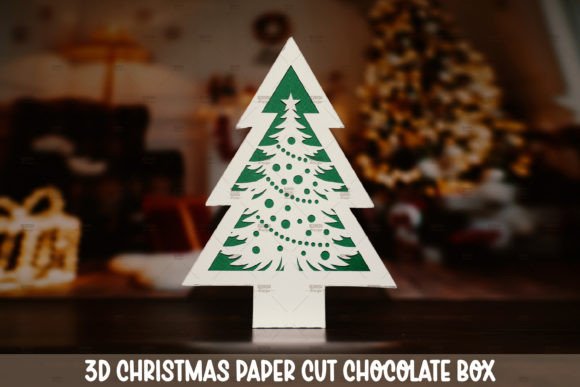
The Christmas Tree Box SVG specifically refers to a digital template designed to create an "explosion box." An explosion box is a flat-packed cardboard or paper structure that, when the lid is removed, unfolds outward to reveal multiple layers of decoration. The central theme here is a Christmas tree, often featuring intricate cutouts of branches, ornaments, stars, and snowflakes that form a cohesive holiday scene.
These designs are particularly popular because they combine the nostalgia of handmade gifts with the precision of modern technology. They allow crafters to produce consistent, clean cuts that would be incredibly difficult to achieve by hand with scissors alone.
Why Choose Digital SVG Over Physical Kits?
In the past, if you wanted to make an explosion box, you might have purchased a pre-cut kit or spent hours manually tracing and cutting each layer. Today, the shift toward INSTANT DOWNLOAD digital files offers several distinct advantages:
- Cost-Effectiveness: Once you own the machine, buying a single digital file is significantly cheaper than purchasing physical kits repeatedly.
- Customization: Digital files allow you to resize elements. Want a smaller box? Just change the dimensions in your software before sending it to the cutter.
- Speed: With an instant download, you can start your project minutes after purchase, making last-minute holiday gifting much less stressful.
- Eco-Friendliness: By choosing digital downloads, you reduce packaging waste associated with shipping physical products.
Preparing Your Files: Essential Steps for Success
While the concept sounds simple, achieving a perfect cut requires attention to detail. Many beginners encounter issues not because the design is flawed, but because the file preparation was overlooked. Here is a step-by-step breakdown of how to handle your Christmas Tree Box SVG effectively.
1. Un-grouping the Layers
When you first import an SVG into software like Silhouette Studio or Cricut Design Space, all the individual pieces are usually grouped together as a single object. To cut them correctly, you must separate them. Look for the option to Ungroup. This ensures that every line, curve, and shape is treated as an independent entity. If you skip this step, your machine may attempt to cut through multiple layers simultaneously, resulting in misaligned cuts or damaged material.
2. Understanding Line Types: Solid vs. Dashed
This is perhaps the most critical technical aspect of using SVG files. Different lines within the same file serve different purposes:
- Solid Lines: Typically indicate "Cut" lines. These are the outer edges of your shapes that need to be severed from the main sheet of paper or cardstock.
- Dashed or Dotted Lines: Often represent "Score" lines. Scoring involves pressing a blade lightly into the material to create a fold line without cutting all the way through. This allows the box to fold neatly along the designated creases.
Pro Tip: If your software does not automatically recognize score lines, you may need to manually change the line style to dashed. For example, in Silhouette Studio, you can right-click on a line and select "Line Type" to assign it to the scoring tool instead of the cutting blade. Failing to distinguish between cut and score lines is a common reason why explosion boxes fail to fold properly.
3. Material Selection
The success of your project also depends on the materials you choose. For a Christmas Tree Box, heavy-weight cardstock (usually between 110lb and 160lb) is recommended. Lighter paper may tear during unfolding, while extremely thick cardboard might overwhelm the motor of your cutting machine. Always test your settings on a small scrap piece of the same material before committing to the final project.
The Significance of Personalized Gifting
Beyond the technical aspects, there is a profound emotional value in creating items by hand. In an era dominated by mass-produced consumer goods, a handmade explosion box stands out as a token of genuine care and effort.
The Christmas Tree Box SVG is ideal for expressing gratitude to teachers, appreciation for colleagues, or love for family members. The process of assembling the box—layer by layer—allows the creator to infuse their personality into the gift. You can add photos, handwritten notes, or even small candies inside the compartments. It transforms a simple present into a memorable experience.
Integrating Creativity with Technology
Some might argue that using a machine like the Cricut or Cameo removes the "human touch" from crafting. However, the opposite is true. Technology handles the tedious, precise cutting, freeing up the crafter to focus on design, assembly, and decoration. It democratizes craftsmanship, allowing individuals with limited artistic drawing skills to produce stunning results. The machine is merely the tool; the vision remains entirely human.
Common Misunderstandings About Digital Downloads
As with any digital product, there are frequent misconceptions among new users. It is important to clarify what you are actually purchasing.
No Physical Product Will Be Mailed: When you buy a digital SVG file, you are purchasing a license to use that design. You will receive a ZIP folder containing your files immediately after payment. There is no waiting period for shipping, and no physical item arrives at your door. Ensure you have the necessary software installed to open and edit these files.
Compatibility Issues: Most modern cutting machines support SVG files natively. However, older versions of software or specific operating systems might require updates. Always check the compatibility list provided by the designer (such as Reddish) to ensure your setup is ready.
Maximizing Your Crafting Potential
Once you have mastered the Christmas Tree Box, the possibilities expand. The same principles apply to other seasonal designs, birthday boxes, or wedding favors. By building a library of high-quality SVG files, you create a versatile toolkit for any occasion.
Many designers, including those behind the Reddish with ❤ collection, offer extensive libraries of patterns. Exploring these collections allows you to experiment with different themes and styles. Whether you are looking for minimalist modern designs or ornate, traditional holiday motifs, there is likely a pattern that fits your aesthetic.
Building a Sustainable Crafting Habit
Embracing digital crafting encourages sustainability. Since you only print or cut what you need, there is less waste. Furthermore, digital files never degrade. You can save your favorite designs and reuse them year after year. This longevity adds value to your initial investment, making digital crafting a smart choice for both your wallet and the environment.
Conclusion
The Christmas Tree Box SVG represents the perfect intersection of tradition and innovation. It allows us to honor the spirit of giving through handmade gestures while leveraging the power of modern technology to execute complex designs with ease. By understanding how to ungroup files, differentiate between cut and score lines, and select appropriate materials, you can create breathtaking gifts that delight recipients.
Whether you are using a Cricut, a Silhouette Cameo, or another compatible device, the key to success lies in preparation and patience. Take the time to set up your workspace, double-check your software settings, and enjoy the process of creation. After all, the joy of crafting is not just in the final product, but in the thoughtful effort put into every layer. So, download your files, fire up your machine, and start creating memories that unfold beautifully.
Thanks for stopping by Reddish with ❤. Happy crafting!