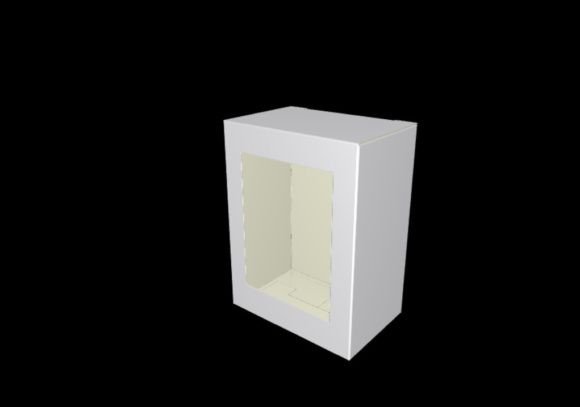
Template Box with Window: Strategic Packaging Solutions for Scalable Projects
In the landscape of modern small business operations, product presentation is not merely an aesthetic choice; it is a critical component of brand positioning and customer experience. For entrepreneurs, makers, and creators who produce tangible goods, the transition from raw material to finished product requires precision, efficiency, and consistency. This is where a Template Box with Window becomes more than just a digital file—it serves as a foundational tool for operational scalability and professional branding.
The specific template discussed here offers dimensions of 3.15 x 2.36 x 1.57 inches (8x6x4cm), which translates to a scalable project size of 20.95 cm x 16.15 cm or approximately 8.25 inches x 6.36 inches. These measurements are ideal for compact, high-value items such as jewelry, cosmetics samples, artisanal chocolates, or small tech accessories. By utilizing a vector-based SVG and DXF format, users gain the flexibility to adapt this packaging solution to their exact needs, ensuring that every unit produced meets rigorous quality standards.
Understanding the Technical Specifications and Versatility
The core value of this digital asset lies in its editable vector nature. Unlike raster images, vector files like SVG and DXF allow for infinite scalability without loss of resolution. This means that whether you are producing a single prototype for a local craft fair or scaling up to fulfill hundreds of orders for an e-commerce platform, the structural integrity of the box remains consistent. The ability to resize the design ensures that your packaging can evolve alongside your business growth.
Key technical features include:
- Scalability: The template supports resizing to accommodate various product sizes while maintaining proportional accuracy.
- Format Compatibility: Available in both SVG and DXF formats, ensuring seamless integration with major cutting machines such as Cricut and Silhouette.
- Precision Scoring: The inclusion of score lines allows for clean, crisp folds, resulting in a professional finish that enhances perceived product value.
- Window Feature: The integrated window design provides transparency, allowing customers to view the product before purchase, which can significantly reduce return rates and increase conversion.
It is important to note that the clip arts or patterns used in the product images are not included with the box template. The template provides the structural framework, leaving the creative customization entirely to the user. This separation allows businesses to apply their own branding, logos, and color schemes without legal constraints regarding third-party artwork.
Strategic Applications for Small Business Owners
For small business owners, packaging is often the first physical touchpoint a customer has with the brand. A well-designed box communicates attention to detail and care. Using a Template Box with Window strategically can support several key business goals:
Enhancing Brand Identity
Consistency in packaging reinforces brand recognition. By customizing the exterior of the box with your logo and color palette, you create a cohesive unboxing experience. The window feature adds a layer of authenticity, showing that you have nothing to hide about your product. This transparency builds trust, which is essential for building long-term customer loyalty.
Optimizing Operational Efficiency
Time is a scarce resource for solopreneurs and small teams. Pre-designed templates eliminate the need to draft box structures from scratch for every new product launch. By importing the SVG or DXF file into your cutting software, you can quickly prepare files for production. This reduces setup time and minimizes errors associated with manual measuring and cutting, allowing you to focus on marketing and sales.
Supporting Product Positioning
The size of the box—approximately 8.25 x 6.36 inches when scaled—suggests a premium, curated feel. It is large enough to house multiple items or a substantial single item, yet compact enough to keep shipping costs low. This balance between perceived value and logistical efficiency is crucial for maintaining healthy profit margins. When customers receive a package that feels substantial and well-crafted, they are more likely to perceive the product inside as high-quality.
Technical Implementation and Workflow
To maximize the utility of this template, users must understand the workflow involved in preparing the files for cutting machines. Proper preparation ensures that the final cut matches the intended design specifications.
Using with Cricut Design Space
When importing the SVG file into Cricut Design Space, it is essential to resize the image to match your desired physical dimensions. After resizing, you must identify the green lines within the design. These lines represent score marks rather than cut lines. Ensure that these are set to "Score" in the machine settings to create clean folds without cutting through the material. Failure to distinguish between cut and score lines can result in a non-functional box.
Using with Silhouette Studio
For users of Silhouette machines, the DXF file is typically preferred. Similar to the Cricut workflow, import the file and adjust the scale to fit your requirements. Locate the green lines indicating score marks and change their operation type to "Score." This step is critical for achieving the sharp, professional folds necessary for a sturdy box structure.
Material Selection Considerations
The success of the box depends heavily on the material chosen. Cardstock is a popular choice for its rigidity and ease of folding, but heavier cardboards may require more powerful cutting blades. Thin paper may lack the durability needed for shipping. Experiment with different materials to find the balance between aesthetics and functionality. Always test a prototype before committing to a large production run.
Risks and Mitigation Strategies
While digital templates offer significant advantages, relying on them without proper planning can lead to operational pitfalls. One common risk is ignoring the dimensional constraints of the template. If the product being packaged exceeds the internal dimensions of the box, the closure mechanism may fail, leading to damaged goods during transit. To mitigate this, always measure your products precisely and use the scalable features of the template to adjust if necessary.
Another risk is over-customization. While the template allows for extensive design changes, adding too many elements or complex graphics can obscure the window feature or make the box difficult to assemble. Strive for simplicity and clarity in your design. The goal is to enhance the product, not distract from it.
Furthermore, users should be aware that this item is an instant download. There is no physical item shipped, and due to the digital nature of the product, exchanges or refunds cannot be given. This policy underscores the importance of verifying compatibility with your specific equipment and software before purchase. Ensure that your cutting machine supports the required file formats and that you have the necessary skills to operate the software effectively.
Long-Term Value and Decision Making
Investing in a high-quality, scalable template like the Template Box with Window is a strategic decision that pays dividends over time. As your business grows, the ability to quickly adapt packaging to new product lines becomes invaluable. The template’s versatility allows you to maintain a consistent brand voice across different product categories, reinforcing your market position.
For educators and hobbyists, this template offers a practical way to teach principles of design, geometry, and manufacturing. It provides a hands-on approach to understanding how digital designs translate into physical objects, making it a valuable educational tool.
Ultimately, the decision to use this template should be guided by clear goals. Are you looking to reduce packaging costs? Enhance brand perception? Improve production speed? By aligning the use of the Template Box with Window with these objectives, you can ensure that every box produced contributes to your broader business strategy. Take the time to plan your design, test your materials, and refine your process. With thoughtful execution, this simple template can become a powerful asset in your entrepreneurial toolkit.
If you encounter any issues with the files or require information about other types of cutting machines, please contact us directly. Our support team is available to assist you in making informed decisions that lead to better results for your projects.